Downloadable browser tool · CSV review
Barcode Alias Cleaner
Review supplier barcode aliases before your next Shopify CSV import.
A supplier’s code, an older internal code and a manufacturer’s UPC can all refer to the same item. Compare the evidence, choose the aliases that belong together and approve which code comes first.
Designed to follow Shopify’s documented product CSV format.
- Files stay on your computer
- Save and resume your review
- No AI account needed
Keep control of each barcode change
- Compare your product export with a supplier sheet using exact SKU matches.
- Spot duplicate aliases, codes shared across variants, missing first codes and invalid check digits for supported types.
- Accept or reject each proposal. Choose the target variant yourself when a SKU has more than one match.
- Edit the list and confirm its exact order. The app never chooses the first barcode for you.
- Download the reviewed CSV with unrelated fields and image rows preserved.
Pick up where you left off
Download a saved review file before closing the app. Reopen it later to restore the original inputs, review decisions and undo history.
Your original catalog and supplier files remain available as separate downloads. The change log shows which decisions you made and the source records behind them.
Work is saved when you download a review file. There is no automatic save. Keep saved reviews private because they include both input files.
See the review before you export
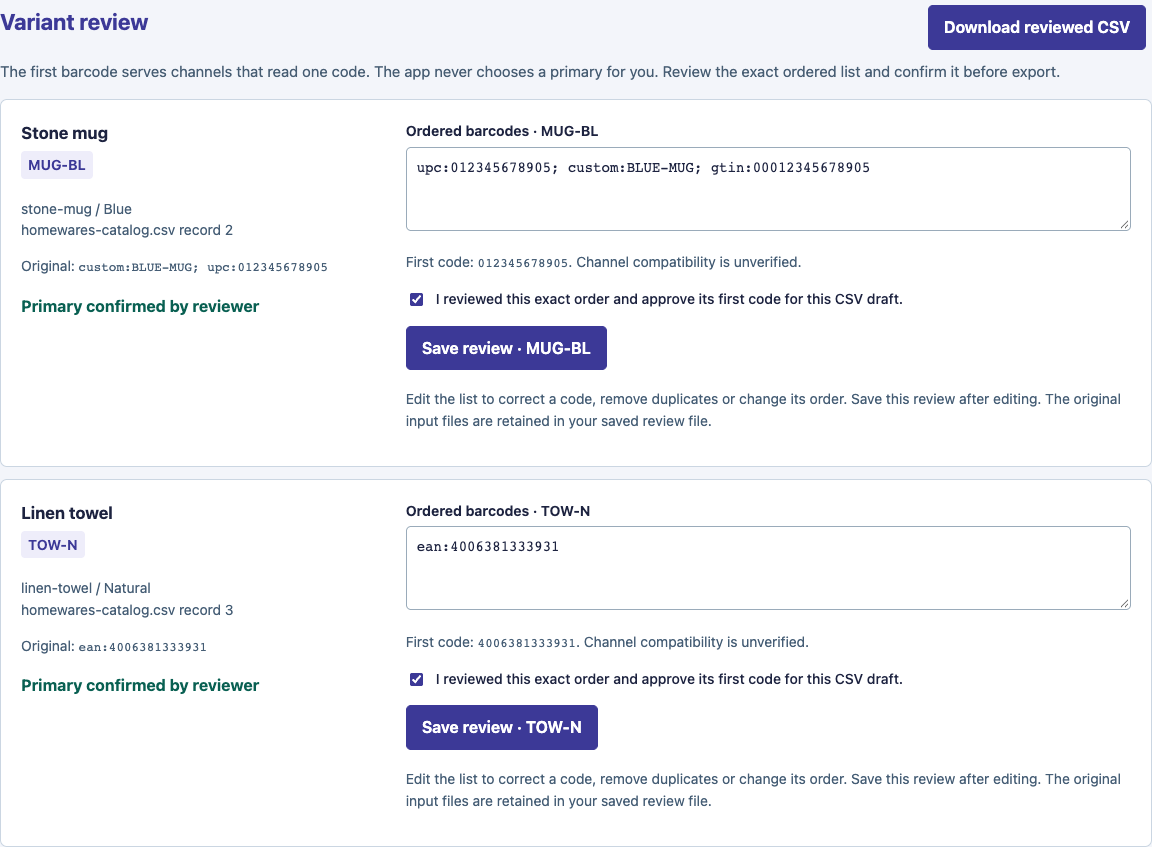
Actual app screen with fictional Homewares data. The UPC is first because the reviewer chose and confirmed that order. View the full-size screenshot.
How it works
Choose two CSV files
Use a full Shopify product export and a supplier sheet in the included template. Start with the fictional examples if you want to practice.
Review the suggestions
Check the SKU and source evidence, decide which aliases to accept and confirm each variant’s first code.
Download your reviewed CSV
Keep a backup, review the result and use Shopify’s manual CSV import when you’re ready. The app does not connect to your store.
What’s in your download
- Barcode Alias Cleaner browser app, version 1.0.2
- Quick-start guide with backup, import and troubleshooting instructions
- Supplier CSV template: one SKU, declared type and literal code per row
- Four fictional catalog/supplier pairs, including ambiguous matches and continuation-row examples
- A saved-review example and its expected CSV output
- Version notes and a file inventory
This is a browser tool. You don’t need a ChatGPT or Claude account, a skill installation, Node or a development server to use it.
Check the fit before you buy
Which files and catalog sizes can I use?
UTF-8, comma-separated CSV files, up to 500 data rows and 1 MiB per input. The catalog limit includes image rows. Each variant can have up to 20 barcode aliases. Use a full product export, with one supported plural barcode column and the original variant context retained.
The supplier template requires SKU, Type and Code, with an optional Title for context. Matches are exact and case-sensitive. Unmatched suggestions need rejection or correction in your source copy.
Which barcode types are supported?
UPC-A, EAN, GTIN, ISBN, ASIN and custom codes have type-appropriate format checks. UPC-E is unsupported and blocks export. Don’t change a code’s declared type to bypass a hold.
Format and check-digit checks do not establish barcode ownership, authenticity or sales-channel acceptance. Confirm those details for your products.
Which computers and browsers have been tested?
The downloadable app was tested on macOS in desktop Chrome and Firefox. Windows, Linux and mobile support have not been verified. Use a desktop browser that permits opening local HTML files and downloading review files.
Does my catalog leave my computer?
The app processes your selected files in the browser. It has no analytics, cloud uploads, model calls or store connection. You decide where to keep the CSV exports and saved reviews.
Can I update Shopify directly from the app?
The workflow is CSV-only. You download the reviewed file and control its manual import into Shopify. Keep an untouched export backup and review Shopify’s import preview before confirming changes.
Can I use the fictional examples in my store?
The examples are for practice. They include deliberately invalid or ambiguous values so you can learn the review flow. The continuation example also includes preservation-test columns. Keep these separate from your real product catalog.
Questions about the tool? Contact Everyday AI Made Simple.